How to play Flopbox on PC, Chromebook and phone
Flopbox is a free ragdoll game in browser with no download, and it plays on a PC, a Chromebook, a phone or with a gamepad. To play Flopbox, open the page and press PLAY: move with WASD, aim with the mouse, click to use the selected tool, and press Tab for the tools menu. On a phone, use the left thumb to move, the right thumb to aim and the red button to fire. There are no levels or goals; the point is the physics and what you can see afterwards.
Play Flopbox freeIn your browser. No download.
Content note: Flopbox contains stylised injury and blood on crash-test dummies. It is intended for ages 13 and up.
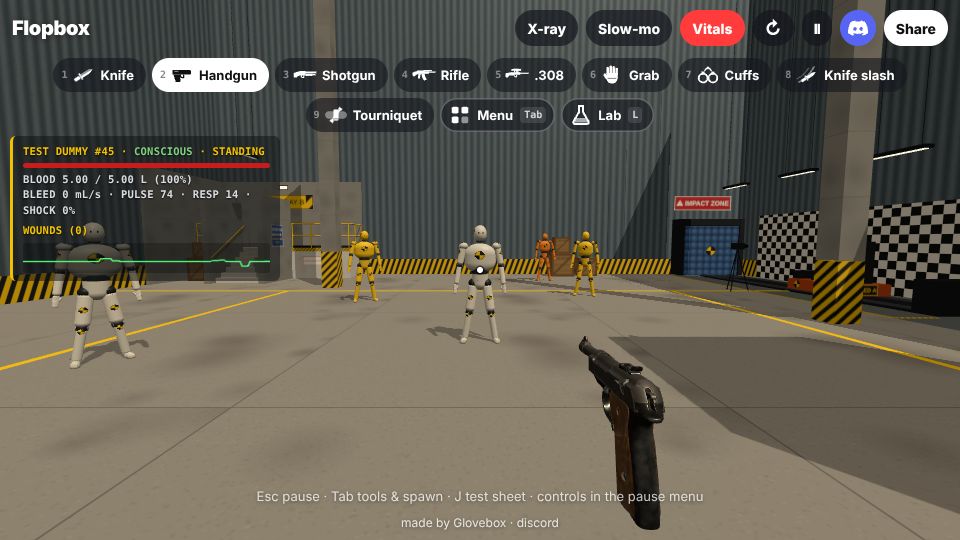
Keyboard and mouse
| Move | WASD or arrow keys. Space jumps. |
|---|---|
| Aim, shoot | Mouse to aim, click to shoot or use the tool. Right-click or Z zooms. |
| Switch tool | 1 to 9 or the mouse wheel. Tab or Q opens the tools and spawn menu. |
| Tool shortcuts | E fire axe, H sledgehammer, F flame torch, C acid, G hand grenade. |
| Spawn | N test dummy, B fuel drum, U ramp, R new dummies. |
| Views | X X-ray, T slow-mo, V vitals, K autopsy cam. |
| Lab | L opens lab modes, Y cycles gravity, I freezes time, O is photo mode. |
| Pause | Esc or P. The pause menu also has the Controls screen, Performance mode and the kill cam and autopsy cam switches. |
Phone and tablet
| Move | Left thumb. |
|---|---|
| Aim | Right thumb. |
| Fire | The red button. Hold it and slide to knife-slash. |
| Tools | The grid button opens the tools and spawn menu; the quick-bar swipes. |
| Zoom | The scope button above and to the right of the fire button. |
The yellow lift in the room carries you up the 10 metre drop tower.
Controller
| Move, aim | Left stick moves (click to sprint). Right stick aims (click for the autopsy cam). |
|---|---|
| Shoot, zoom | Right trigger shoots or uses the tool; left trigger zooms (with the axe in hand it throws). |
| Jump, switch | A jumps. LB and RB, or D-pad left and right, switch tool. |
| Menus, views | Y opens the tools and spawn menu. X is X-ray, B is slow-mo, View is vitals. Menu pauses. |
| Spawn | D-pad up spawns a test dummy; D-pad down a fuel drum. |
Xbox controllers on some browsers move a cursor instead of the game: hold the Menu button and choose "Use game controls". Xbox, PlayStation and Steam Deck pads are supported.
Lab modes
- Gravity: Earth, Moon, Zero-G or Jupiter. It is a per-visit toy and resets when you reload.
- Freeze time: the world stops but you can still move, aim and shoot, and every hit lands when time resumes.
- Photo mode: a free camera with a zoom slider and a picture button that saves or shares the image.
Tips
- Turn on X-ray (X) before a shot, then check where the round went. The vitals panel (V) names the vessels and bones involved.
- The .308 with the kill cam and autopsy cam on gives the clearest look at a bullet path.
- Try the same shot in Moon gravity and in Zero-G.
- Hurt dummies react: they stagger, clutch wounds and crawl. A tourniquet on a bleeding arm or leg slows the bleeding, then stops it.
- Slow-mo (T) and freeze time (I) make the knife slash and the axe easier to place on a joint.
- If you use a Chromebook or a laptop with a trackpad, the mouse wheel switches one tool per notch; the number keys 1 to 9 are quicker.
- If the game runs badly, switch on Performance mode in the pause menu, or play the classic version.
The full list of what each tool does is on the tools page.
Frequently asked questions
What is Flopbox?
Flopbox is a free 3D ragdoll physics sandbox you play in your browser, made by Glovebox. You use guns, blades, fire, acid and other tools on crash-test dummies, then look at the result with X-ray, a vitals panel and an autopsy view. It is a realistic injury simulation with layered anatomy (skin, fat, muscle, bone, organs), it has 20 tools and props, runs without a download, and works on desktop, phones and with a controller. The current version is v1.1.1.
Is Flopbox a free ragdoll game in browser?
Yes. Flopbox is a free ragdoll game in browser: you open the page and press PLAY, with no download, no install and no account.
Is Flopbox a ragdoll sandbox unblocked at school or work?
Flopbox is a ragdoll sandbox that runs entirely in the browser tab, so there is nothing to install, which is what blocks most games. It is a normal website on f.playglovebox.com, so it may work where installs are blocked, but a school or work network can still block any site, and Flopbox cannot change that.
Are there games like People Playground online?
Flopbox is one: games like People Playground online are usually open-ended sandboxes where you pick tools and test them on a body, and Flopbox is a free 3D one that runs in your browser. It is a different game: first-person and focused on anatomy, with no contraption building or mods. People Playground is not affiliated with Flopbox.
Can I play Flopbox on a phone?
Yes. There are touch controls: left thumb moves, right thumb aims, and a red button fires. Phones with weak graphics chips start in a lighter mode, and Performance mode in the pause menu lowers the cost further.
Can I play Flopbox on a Chromebook?
It should work. Flopbox runs in a current browser that supports WebGL 2, including Chrome on ChromeOS, with keyboard and mouse. If it stutters, turn on Performance mode in the pause menu or play the classic version at /classic/.
Does Flopbox need a download or install?
No. It runs in the browser tab. Nothing is installed.
What are the controls in Flopbox?
On desktop: WASD to move, Space to jump, mouse to aim, click to shoot, 1 to 9 or the wheel to switch tool, Tab or Q for the tools menu, X for X-ray, T for slow-mo, V for vitals, K for the autopsy cam, Esc to pause. Phones and controllers have their own controls, listed on this page.
Why is Flopbox stuck loading or showing a blank screen?
Flopbox needs WebGL 2 and a working graphics driver. Update your browser to the latest version, make sure hardware acceleration is on (in Chrome: Settings, System, "Use graphics acceleration when available", then restart the browser), close other heavy tabs, and reload. If it still will not start, play the classic version at /classic/, which is the lighter previous release. Adding ?debug to the address shows a report you can screenshot and send in the Discord.
Who made Flopbox?
Flopbox is made by Glovebox (playglovebox.com). Bug reports and ideas go to the Flopbox Discord.
Is Flopbox gory?
It shows stylised injuries on test dummies, not people, and blood is part of the simulation. There is no setting that turns blood off; the dummies are crash-test mannequins in a lab, and the game is intended for ages 13 and up.
What is the age rating for Flopbox?
Flopbox has no official rating. It contains stylised injury and blood on crash-test dummies and is intended for ages 13 and up.
Play Flopbox freeIn your browser. No download.